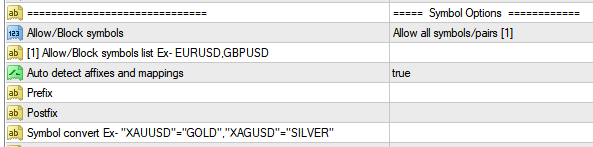
Allow/Block symbols – Select which mode of symbol / currency pair filtration should be used.
| Block symbols/pairs [1] | Symbols to be blocked. Others will be allowed. |
| Only allow symbols/pairs [1] | Symbols to be allowed. Others will be blocked. |
| Allow all symbols/pairs | No filtration is performed. All symbols are allowed. |
Allow/Block symbols list – Enter list of symbols to be blocked/allowed.
| [1]Allow/Block symbols list | Symbols should be entered (Comma separated Ex: EURUSD, GBPUSD) according to Allow/Block symbols setting chosen in the previous setting. |
Auto detect affixes and mappings – Select whether symbol prefixes/postfixes should be auto detected.
| Auto detect affixes and mappings | When set to true, the copier will attempt to automatically detect symbol prefixes and post-fixes.
This method is effective for most accounts available.
Prefix and Post-fix settings will be disabled if this setting is enabled. |
Prefix – Assign prefix for symbols if required.
| Prefix | If prefixes are being used for symbols in MT4 account they should be entered here.
Example: micro, nano, ecn |
Postfix – Assign post-fixes for symbols if required.
| Postfix | If post-fixes are being used for symbols in MT4 account they should be entered here.
Example: micro, nano, ecn |
Symbol convert – Enter symbol/currency pair conversions if required.
| Symbol convert | If Signal receives XAUUSD and XAGUSD. But the MT4 Broker uses GOLD, SILVER pairs. They should be entered here. The symbols can be converted as follows,
“Signal symbol” =”MT4 symbol”
Example: “XAUUSD”=”GOLD”, “XAGUSD”=”SILVER”. |