At times, there can be a difference between the symbol available in your MT4 account and symbols available.
In such cases you will see one of following two errors in your MT4. This section will help you to resolve such issues.
1. Unknown Symbol error
This means that the symbol is not found in your MT4 account.

In above example, MT4 account may use XAUUSD symbol for GOLD.
2. Trade is disabled error
This means that the symbol exists in your MT4 account but your broker has disabled it.

In above example, the broker may have disabled trading for this symbol. placing a manual trade for USDRUB will help to confirm whether the symbol is fully disabled for trading or only disabled for Automated trading.
You will get the above errors in the following instances,
Example instance #1
The signal comes as EURUSD
Your Mt4 account uses EURUSD.s instead
Solution
Usually these situations are automatically handled by default. But in cases where MT4 accounts use variations of the same symbol due to the different of post-fixes (Example – MT4 account has EURUSD, EURUSD.s, EURUSD.raw) the copier will fail to recognize the correct symbol you intend to trade.
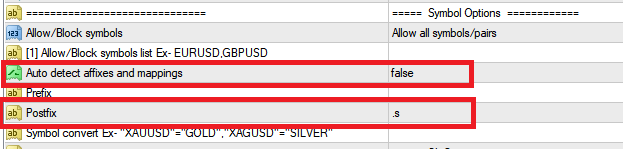
In such cases, you can set EA setting Auto detect affixes and mappings to false and set symbol postfix to .s
Example instance #2
The signal comes as Gold
Your Mt4 account uses XAUUSD instead
Solution
Usually GOLD and SILVER symbols are automatically handled by the copier by default. But in cases where the MT4 accounts use variations of the same symbol due to the different of post-fixes (Example – MT4 account has XAUUSD , XAUUSD .s, XAUUSD .raw) the copier will fail to recognize the correct symbol you intend to trade.
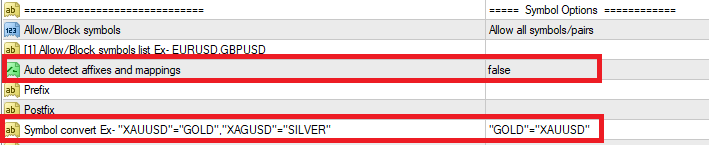
You can set the EA setting Auto detect affixes and mappings to false and Symbol convert as
"GOLD"="XAUUSD"This will map the symbol GOLD (Signal symbol) to XAUUSD (MT4 symbol) in your MT4 account. You can add more mappings this way by separating each by a comma.
Example instance #3
The signal comes as US OIL
The copier does not detect it
Your Mt4 account uses WTIUSD symbol
Solution
Symbols other than Forex major, minor and metals must be manually added to the copier settings for the copier to detect them.
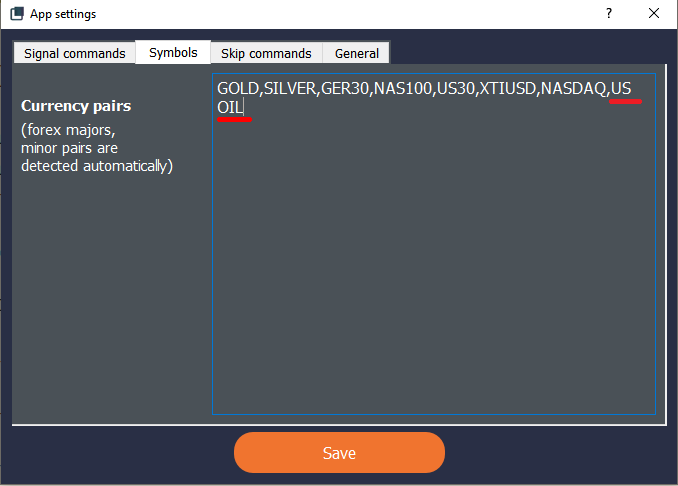
In this instance, you can add US OIL to the “Currency pairs” under “Symbols” in copier settings.
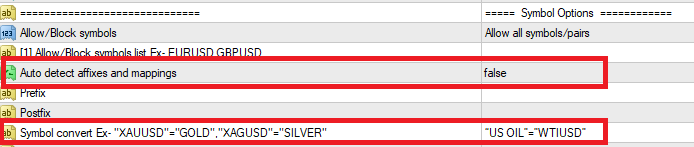
and add the following symbol conversion to EA settings,
"US OIL"="WTIUSD"and set Auto detect affixes and mappings to false.
This will map the symbol US OIL (Signal symbol) to WTIUSD (MT4 symbol) in your MT4 account.